
As in mobile phones and tablets, where anyone can customize their interface by downloading a launcher, Android TV also allows you to install these apps. They are not very popular, but there is more than one good example. We put forward our favorites.
Having Android on the TV allows mobile apps and games to run on a bigger screen. And if says Android, it’s Android TV the use from the remote control is significantly improved, as well as the compatibility of all applications. Even launchers: there is the possibility of leaving the default interface by customizing it with another aspect and another use. Let’s see how to install them and which are the most recommended.
Install a new launcher to mark it as default

Android TV is still an Android even though it is suitable for TV, so there is no faster way to change the interface than install a launcher and choose to open it by default instead of the one that comes through the system. Although yes, it is not that simple in all devices with Android TV.

The steps to change the launcher on Android TV are as follows:
- Install a new launcher on your device. For example, you can start with ATV Launcher.
- Once ATV Launcher has downloaded, click the Start button on your remote. Android TV should ask you if you want to choose the new ATV launcher or the interface that came with your device by default.
- Choose the new launcher and check the “Always” option. You will have changed the interface of your Android TV.
This is the most common, but it’s not always that easy: it is likely that your device manufacturer does not allow another launcher to be applied by default. In this case, you can try the following:
- Go to your Android TV settings and go to ‘Applications’.
- Click “View all apps” and scroll down to “Show system apps”.
- Search for ‘Android TV Home’, go to its menu and click ‘Clear default actions‘. This eliminates the default opening of the system interface.
- Press the start button and Android TV should show you the dialog box to open ATV Launcher or the Android TV startup app.

What still can’t seem to change launcher? It’s time to embark on a little more complicated process and that can damage your Android TV: you need to remove the default launcher from the system. To do this, perform the following process, always have previously installed one of the launchers that we recommend:
- If you don’t have it already, download TV File Commander file manager to your Android TV.
- Make sure your Android TV and the device you downloaded the Apk files to are connected to the same WiFi.
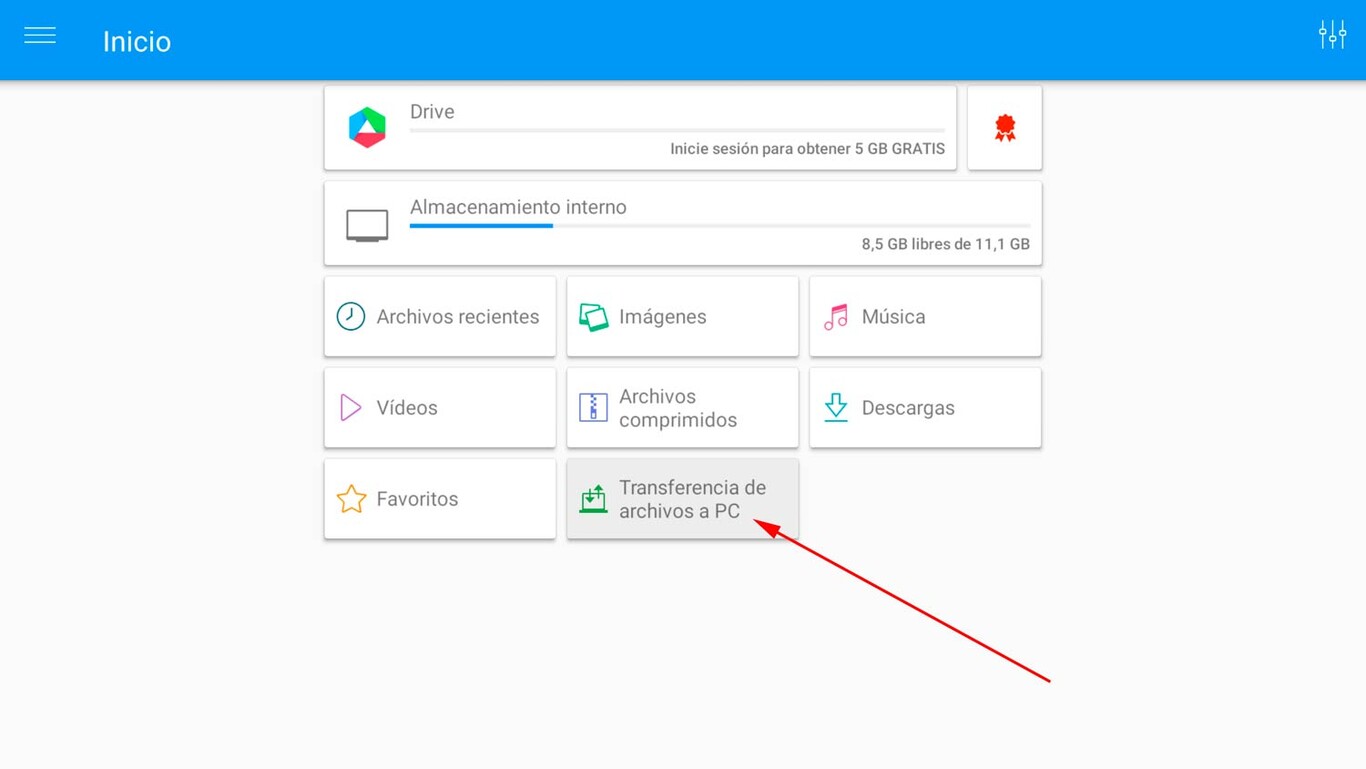
- Open File Commander and click on ‘Transfer files to PC’.
- Click the big “On” button and type the URL into the browser of the device where you downloaded the Apks.
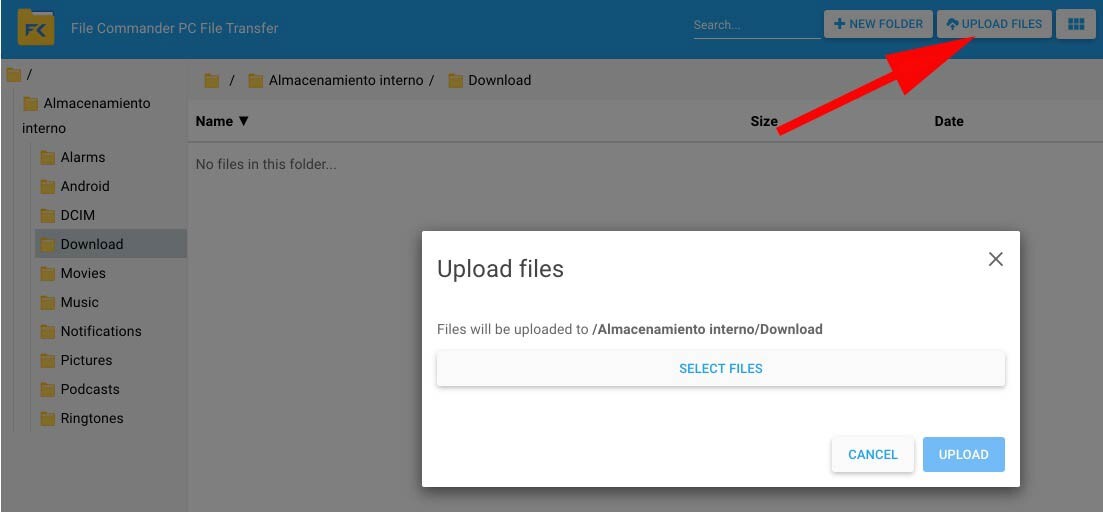
- Go to the download folder of your Android TV (or any other one you want) and download files.
- Go back to the TV File Commander of your Android TV, enter “Internal Storage”, navigate to the folder where the Apks are located and install them. You will have to accept the installation from unknown sources.
- Once the files are installed, touch remove the default launcher from your Android TV. Go to its settings, go to “Device preferences”, go to “Information” and click “Version number” repeatedly until Developer options are enabled.
- Go to “Status” (in “Information”) and write down the IP address of your Android TV.
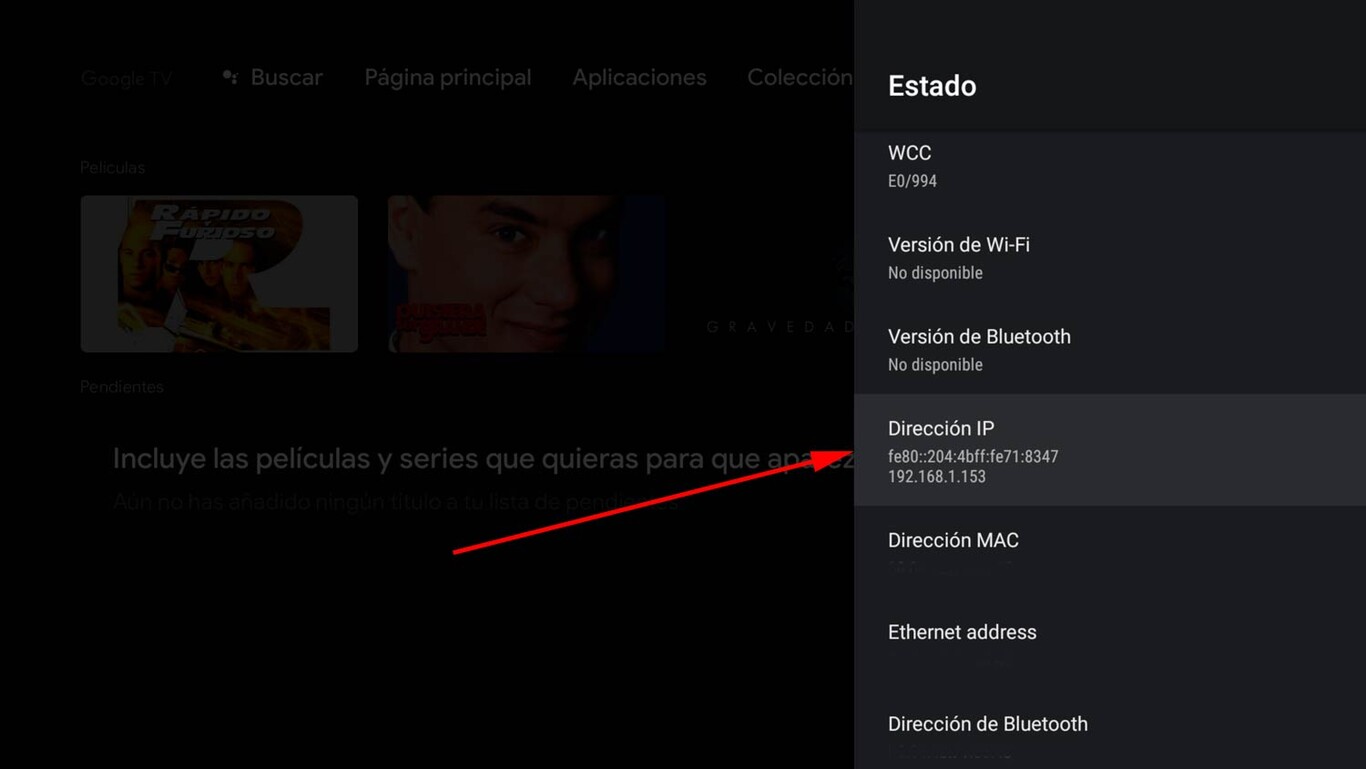
- Go back with the remote and enter the new developer options.
- Activate ‘Network debugging’ and you will be all set to connect via ADB with your Android TV. In case the “USB debugging” does not appear active: this way it is also enabled wirelessly.
- Install the Remote ADB Shell application on your mobile or tablet and open it.
- Enter the IP address you wrote down, the one that matches your Android TV (don’t touch the port). Remember that all devices must be connected to the same WiFi.
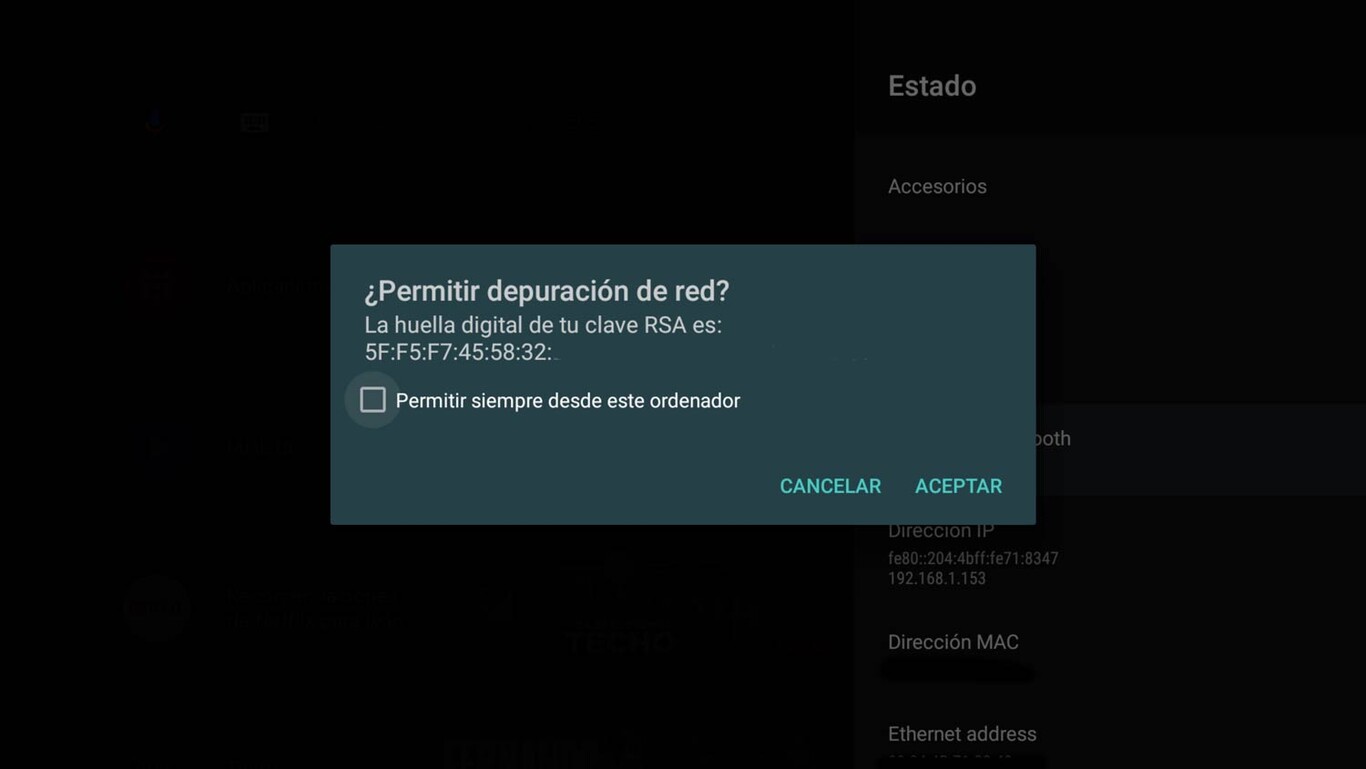
- Accept the network debug permission: it will appear on your TV screen.
- Now copy this code “pm uninstall –user 0 com.google.android.tvlauncher” (without quotes) and paste it in Remote ADB Shell, on mobile. You accept.

- The default installation of the Android TV launcher will have been removed. It does not go away: it will be active again if you restore your device.
- After the ADB instruction is complete, press the start button on your Android TV remote control and you will see that the launcher you installed is loading. It may take a few seconds.
- If you want to return to the default interface of your Android TV, restart the ADB loading process by entering this code: “cmd package install-existing com.google.android.tvlauncher”. This will restore the deleted app.
Once you have the option to change the launcher on Android TV, let’s see which are the most recommended.
Launcher

FLauncher with Matrix Resurrections wallpaper
The best of all available Android TV launchers is also the newest: FLauncher is the go-to choice for anyone who wants to change their TV’s default interface. It is highly customizable, has no advertising and is developed in open source..
FLauncher offers different ways to organize the applications installed on the device, allows you to categorize the grid, offers wallpaper option and works great. It’s a very light launcher and doesn’t cost a dime. It’s worth checking out.

Launcher
Top TV Launcher 2

In line with the previous application, with Top TV Launcher 2, it is possible adapt the appearance of the screen while maintaining the Android TV aesthetic. The launcher allows you to customize the grid, change the wallpaper, the maps can be designed from photos and icons, and it also supports widgets.
Top TV Launcher 2 is a paid application (3.09 dollars), although there is a trial version with which to check that everything is working correctly before paying.

Top TV Launcher 2 – Trial
- Developer: DXIdev
- Download it on: google play
- Price: Free
- Category: Customization

Top TV Launcher 2
- Developer: DXIdev
- Download it on: google play
- Price: Free
- Category: Customization
Google TV Launcher
If you don’t have a Chromecast with Google TV, you can install its launcher. It’s an interface that should reach the rest of Android TV, but it’s not yet found by default in all of them. And you can anticipate: install it by following the following tutorial.
Table of Contents


