
To share
Clarus returns home in macOS Ventura, the curious “dogcow” finds its main function in the new version of the Mac system.
Not long ago we told you about the curious Easter ego that was found in iOS and that no one knew about. This easter egg was related to “Clarus”, known within Apple as “dogcow”, the “cowdog” that for years was present in the macOS print options. And now, the peculiar animal is back in macOS Ventura to its main function.
In 1983, Susan Kare created this icon of a dog as a ‘z’ glyph as part of the ‘Cairo’ font. Soon after, it was decided when designing the Mac OS print dialog use as an example to demonstrate sheet orientation and paper color. Annette Wagner made the decision to use this dog and created a larger version with more appropriate spots to demonstrate the different print options.

Clarus the doggie returns to macOS Ventura
The dogcow, named Clarus, is a bitmap image designed by Apple for Mac OS layout demonstration.
After a while, Clarus stopped being included in macOS printing options, but it looks like Apple brought it back in their new update. As indicated Shadow Facts, “Clarus the Dogcow” is back after disappearing from the Mac a long time ago. In the macOS Ventura beta, you can see Clarus if you open print options in an app that supports it, like Pages.
Like the Clarus of old, in macOS Ventura the dogcow has the same function: shows the orientation of the page we want to print. Of course, it has been completely redesigned since its design has been softened and it is not so pixelated.
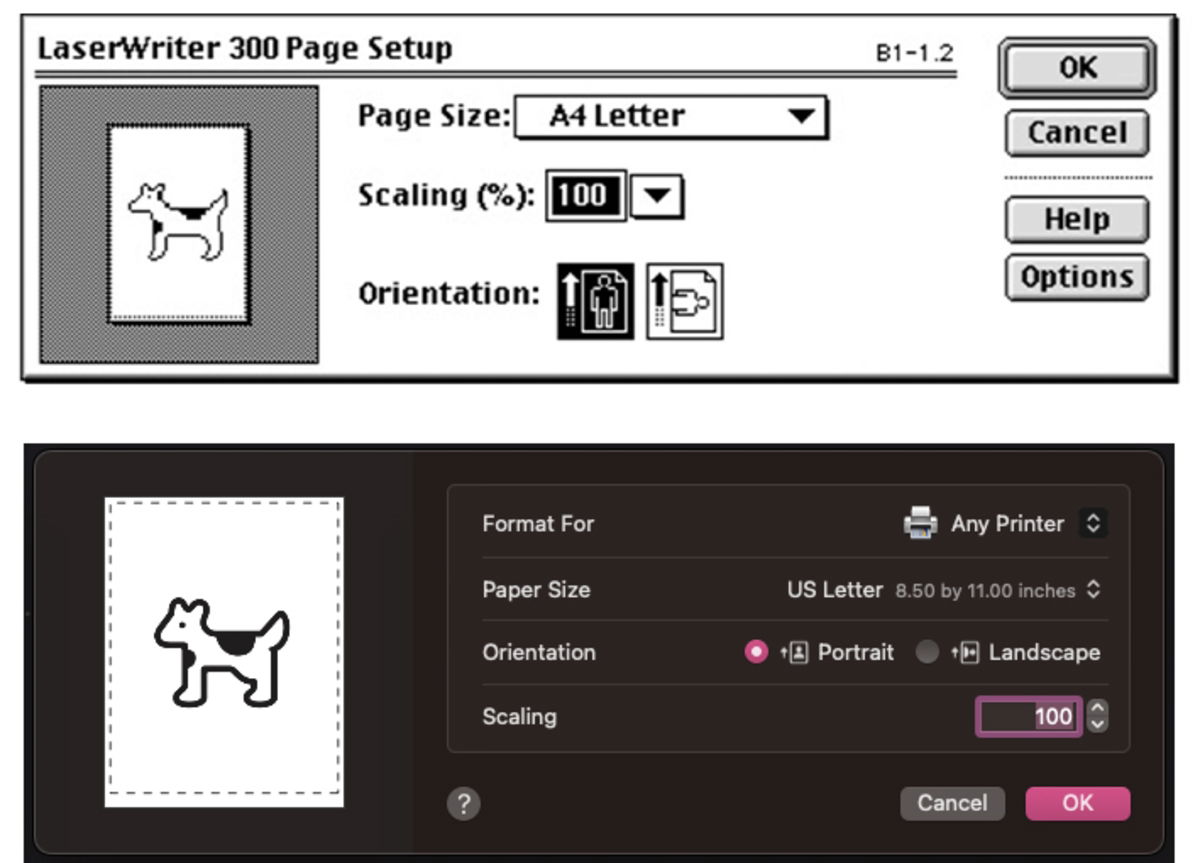
Clarus returns to the print window. Above view of classic Mac OS and below new Clarus in macOS Ventura
definitely a nice nod to Apple’s past, although it remains to be seen if this is something that will only be available in beta or if it will reach the final version. We will have to wait until September to see if one of the protagonists of Apple’s Icon Garden finally returns.
Related Topics: Apple
To share

Sign up for Disney+ for 8.99 dollars and without permanence


