
 At a glance
Expert rating
Benefits
- Excellent image quality
- Nano Matte panel reduces glare and reflections
- Height adjustable support
Disadvantages
- A 60Hz refresh rate may put off gamers
- No webcam
Our Verdict
The BenQ MA270U offers image quality that could satisfy users in a production environment. This is a way of saying that its quality is better than what general users usually get. You might find a 27-inch 4K display a little cheaper, but you'll be hard-pressed to find one this good.
Price when reviewed
This value will display geotagged pricing text for the undefined product
Best price today
If you're looking for a well-priced Mac display, take a look at the BenQ MA270U. Designed for the Mac, this 27-inch 4K display is a nice combination of price, features and picture quality. It's a lot cheaper than the Apple Studio Display, but you won't feel like you're making a sacrifice with the MA270U.
Find out how this monitor compares to others in our roundup of the best screens and monitors for Mac users.
Features
| Size | 27 inches |
| Glass facade | Nano matte panel |
| Aspect ratio | 16:9 |
| Native resolution | 3840 by 2160 |
| Panel/Backlight Type | IPS/LED backlight |
| Response time | 5ms |
| Contrast ratio | 1200:1 |
| Frequency | 24Hz to 60Hz |
| Color depth | 10 bits |
| Brightness | 400 nits |
| Dimensions with support (horizontal) | Highest height: 22.1 x 24.2 x 8.7 inches (560.1 x 613.8 x 220.2 mm) Lowest height: 17.5 x 24.2 x 8.7 inches (445 .1 x 613.8 x 220.2 mm) |
| Weight with support | 18.08 pounds (8.2 kg) |
BenQ MA270U: design and construction
The MA270U has a nice design that complements the Mac's aesthetic: it doesn't completely match, but the screen also doesn't obviously look like a PC screen connected to a Mac. Although there is a lot of plastic on the MA270U, it doesn't look cheap and feels solid and sturdy.
The MA270U has a Nano Matte Panel front but it is not a piece of glass. As the name suggests, it's not glossy, so glare and reflections are virtually non-existent, even more so than with the Apple Studio Display's expensive Nano texture glass.
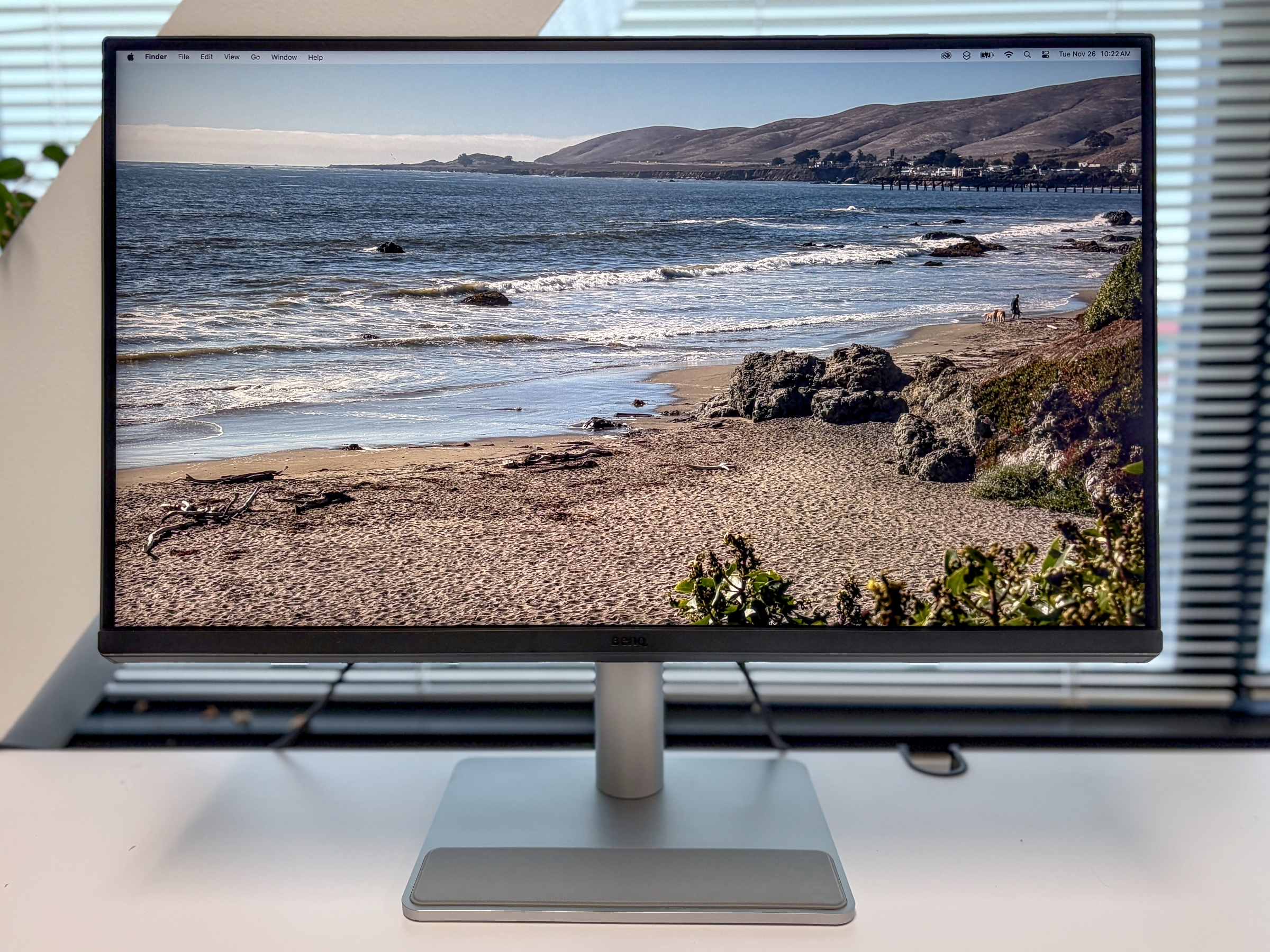
The Nano Matte panel does a great job of reducing glare and reflections.
Foundry
The bezels on the sides and top are less than 1mm wide, about the same as the Apple Studio Display. The bottom bezel is thicker, but it doesn't look disproportionate. The screen bezels remind me a bit of the MacBook Air but without the top camera notch.
BenQ MA270U: Display
A stand is included with the MA270U. Some displays sell the stand separately, which comes at an additional cost, but that is not the case here.
The silver backing is plastic, but it feels sturdy. The base has a slightly raised gray padded platform for placing your AirPods cases and other items, a nice touch.
The stand offers a wide adjustment range: -5 to 20 degrees tilt, swivels 15 degrees left or right and 115 mm height. The screen can also rotate 90 degrees, a much greater range of motion than the Studio Display.
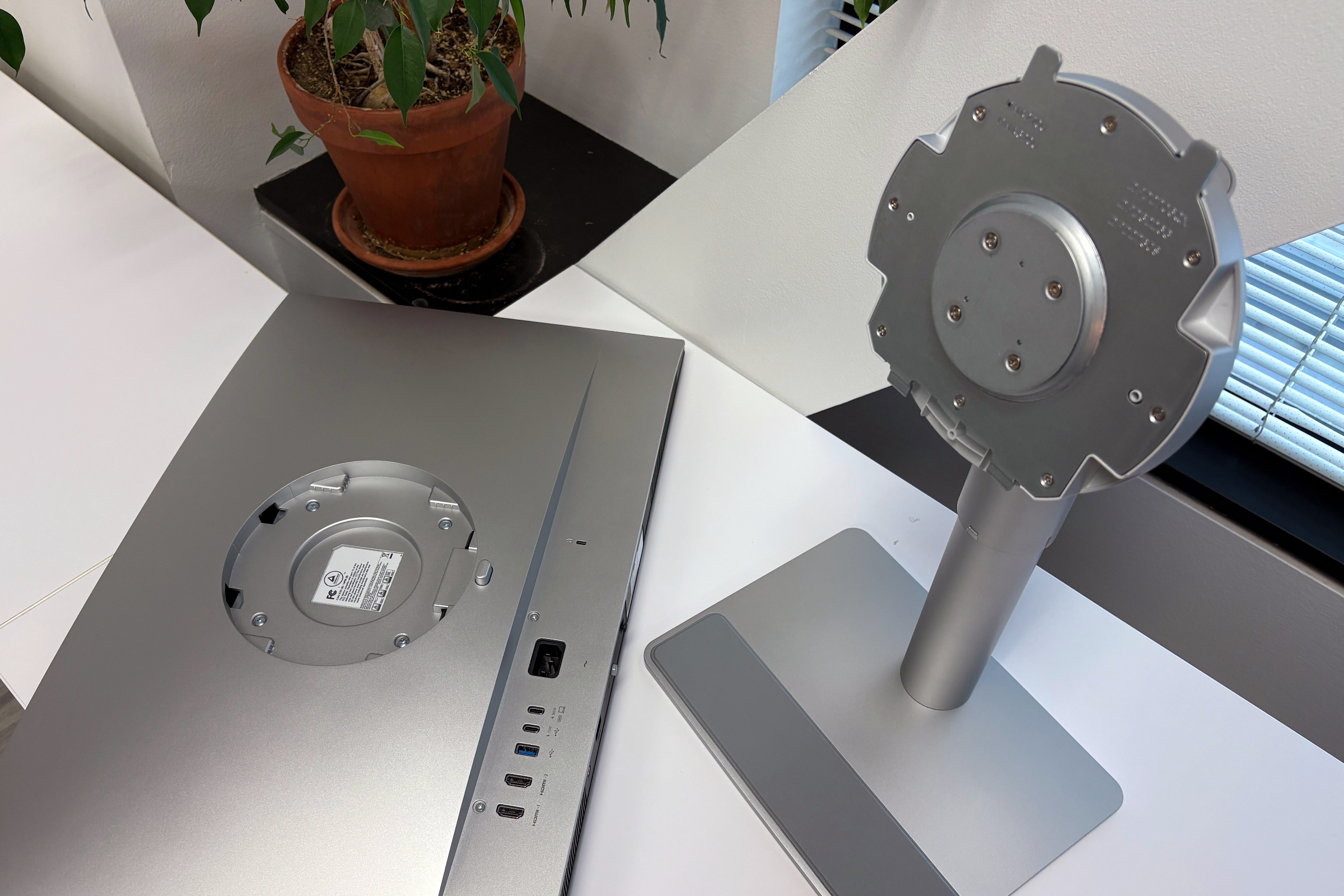
The MA270U can work with VESA wall mounts, but a stand is included.
Foundry
BenQ MA270U: Ports
The MA70U includes the following ports:
- Two HDMI 2.0 ports
- Two USB-A ports (USB 3.2 Gen 1, 5 Gbps, 7.5 W)
- One USB-C (90W power supply)
- A USB-C (USB 3.2 Gen 1, 5 Gbps, 15 W)
- 3.5mm headphone jack
The MA270U can connect to a Mac via HDMI or USB-C. The USB-C connection provides 90 watts of power so you can charge your MacBook at the same time. If you want to use the display as a connection hub, you need to connect to the Mac via USB-C.
One of the USB-A ports is on the back of the display, while the other is below the display, along with the 3.5mm headphone jack. Having the USB-A port under the display is convenient, although you'll probably find someone who wishes it was a USB-C port instead.
BenQ MA270U: Image quality
The one thing that immediately stands out about the MA270U is its impressive image quality. The colors are full of life and the details are excellent. One remarkable aspect of the image quality is the sharpness of the text – it looks so crisp and clean that I would stop every now and then as I wrote this review to simply admire how beautiful my words looked. This is great for production and design work, but it can even make reading and writing more enjoyable.
Since the MA270U is a matte display, black reproduction is not as deep as on a glossy display like the standard Apple Studio Display setup. But it's definitely deep enough to show as black, not as, say, a visible super dark gray.
The screen has a standard 60Hz refresh rate, the same as the Studio Display and fast enough for most users. However, players might not be satisfied and want faster pricing.
BenQ MA270U: integrated controls and Display Pilot 2 software
Below the screen is a mini joystick to access the built-in controls, which only offers brightness adjustment, audio volume for the built-in speakers and changing the input port between both HDMI and USB-C ports . There is also a summary of whether HDR is on/off, screen resolution and refresh rate.
What BenQ really wants you to do is download and install its Display Pilot 2 software for a broader set of display controls. The software is more about adding features than improving image quality; for example, it has a desktop partition feature that looks a lot like window tiling in macOS Sequoia. A nice feature is the app's color mode, where you can assign color profiles to specific apps. For example, you can assign a Cinema color profile to Final Cut Pro and when you launch the application, the display automatically switches to that profile.
BenQ MA270U: Price
The MA270U costs $460/£450 and includes a stand, USB-C cable, and power cable. You will need to purchase an HDMI cable separately if you need one. In the United States, BenQ offers a three-year limited warranty; in the UK it's two years.
Should you buy the BenQ MA270U?
The BenQ MA270U offers image quality that could satisfy users in a production environment. This is a way of saying that its quality is better than what general users usually get. You might be able to find a 27-inch 4K display a little cheaper, but it won't look as good. It's also a nice alternative to the Apple Studio Display 5K, which costs $2,299 when you configure it with a tilt- and height-adjustable stand and nano-textured glass. At its price, the MA 270U looks particularly stylish with a new Mac mini or any Mac, for that matter.
Table of Contents


