
Google Maps has a blue arrow and Waze has the same thing, although a little more stylized. On Android Auto, Waze no option to change car iconalthough it is possible to use a custom template from the extensive list available on Waze.
One of the differences between Waze and Google Maps is that the former offers many customization options, including many cars to choose fromwhich you can also use in Android Auto, if you configure them correctly.
Put a hot car in your Waze
Waze has a handful of settings in Android Auto, but as you might expect, they only cover the most basic aspects of navigation and not some secondary options. In Android Auto's Waze settings, there is no option to change arrow iconbut it is possible to do it. The trick is to do it before.

Unlike Google Maps, Waze doesn't let you use it on your mobile when using it on Android Auto, so you'll have to set it up before connecting to Android Auto. Simply choose the car you want to use in the Waze settings:
- In Waze, open the settings menu.
- Tap Map View.
- Enter car icon.
- Choose the car, bus, motorcycle, van, or other icon you want to use in Waze.
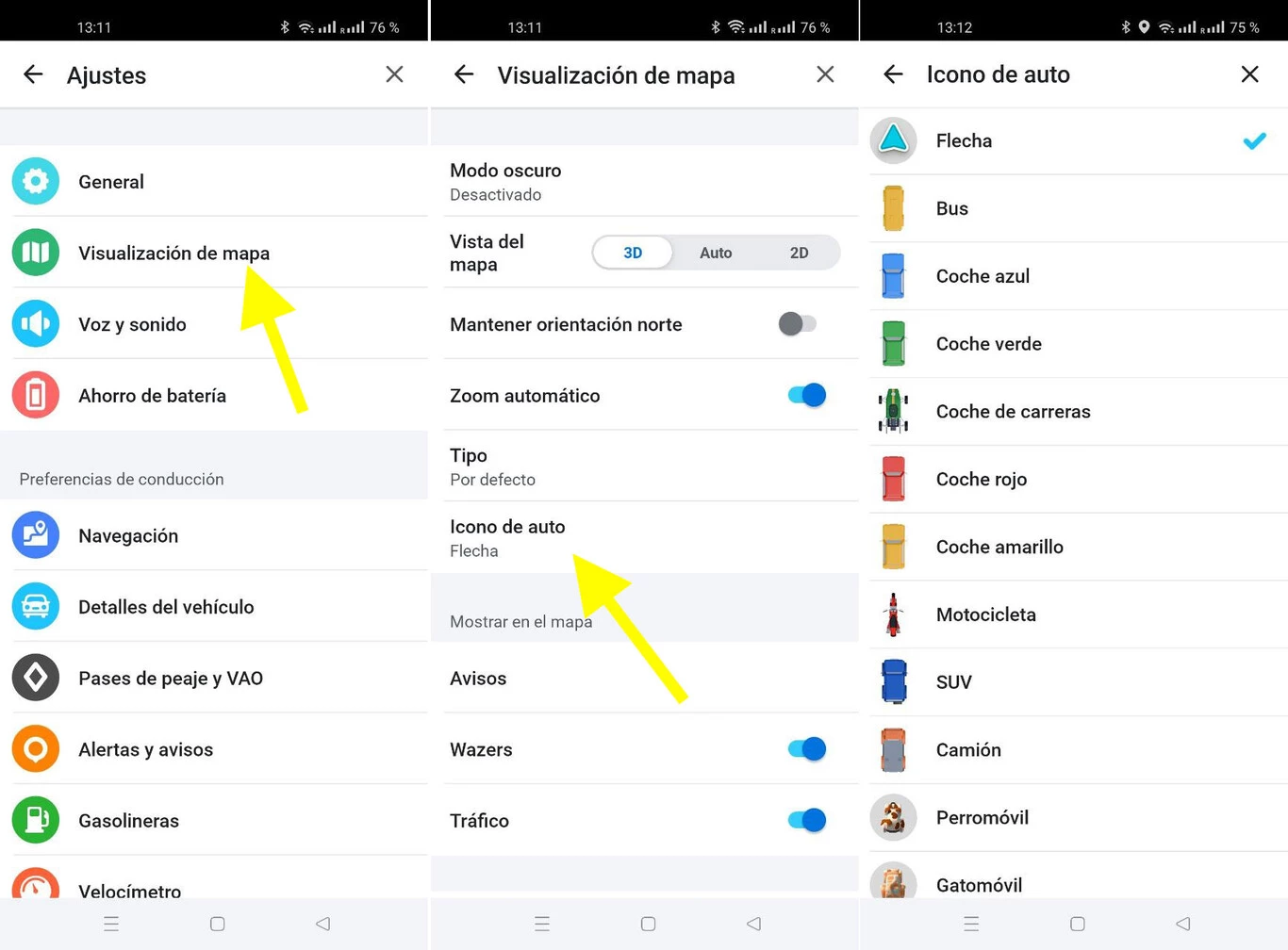
Waze usually introduces new 3D icons for our vehicle very frequently, so you will find a very long list of vehicles ready to use. Unlike Petal Maps, here you can use them all without further ado, without depending on levels or anything like that.
After choosing one, you will be able to see how your new car looks in Waze on your mobile and also the next time you connect your mobile to Android Auto. Waze also displays your personalized vehicle on Android Autoalthough you can't configure it here. For reference, Google Maps still shows the arrow in Android Auto, even if you have another vehicle set up in Google Maps on mobile.

With this simple trick you can have a super car, bus, motorcycle, SUV, truck, red dragon or even Santa's sleigh the next time you take a route in Android Auto. If you find an icon that resembles your car, the result is quite satisfactory.
In Xataka Android | Android Auto: 23 tips and tricks to get the most out of Android in the car


