
Beginning of last January google play Stopped showing notifications for updated apps. All the while, the store was just letting us know if there were any new updates but not if the apps that had been updated.
Now almost a year later these notifications are back. The latest version of Play store (23.2.11) allows retrieve completed update notifications.
The new notification settings

Google Play has renewed its notification settings, adding two new options. If we access Settings> General> Notifications we see the new switches ‘Account’ and “Updates completed” to give us more control over the type of notifications we want to receive.

The new option ‘Account’ is enabled by default and allows turn off notifications about upcoming charges subscriptions or payment method issues.
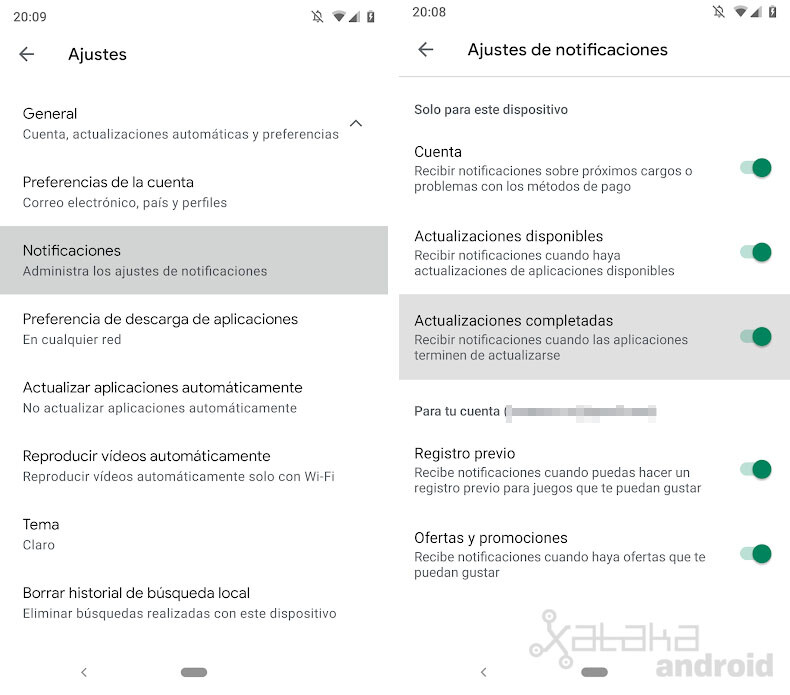
The option “Updates completed” This is the feature that Google suddenly removed at the start of this year and which until now had not given us the option of recovering it. This notification will allow us to receive a notification when the apps have finished updating.
This way, if you have updated the automatic updates, you will be able to see in a notification a notice with all the apps that have been updated that day. It is off by default, so we will have to manually activate it from the Play Store notification settings if we want to receive them.


