
Internet Explorer is long gone, although its final burial will not come until next year. Still, it is not difficult to stumble upon a web page that refuses to open because you are not using Internet Explorer, even if you are on a mobile.
There is no Internet Explorer for Android and there never was, but there are methods to cheat web pages and this think you are using Internet Explorer. This is a trick that will help you in some cases to use these pages which ask for Internet Explorer on an Android mobile.
Con Chameleon Browser

Chameleon Browser is a very basic web browser which, as the name suggests, specializes in camouflage in other browsers. When you use it, you need to press Select user agent and choose the browser you want to simulate, for example Internet Explorer.

This will make the web page you open later (which you should write in Enter a url) that you are using Internet Explorer. Usually this will allow you to load the page, but keep in mind that it might not work properlyespecially if you need add-ons. Additionally, the desktop version will load.

Chameleon browser (UserAgent)
- Developer: sky cat
- Download it on: google play
- Price: Free
- Category: Communication
Con Dolphin Navigator

If you prefer a better performing web browser, you can also change user agent in Dolphin browser, a more usable browser. In this case the option is no longer hidden: you have to touch the dolphin icon, go to options, section Advanced and press User agent.
You don’t have a list here to choose from, but you must write it by hand. You can view the list of Internet Explorer user agents here. For Internet Explorer 11 on Windows 10, use Mozilla/5.0 (Windows NT 10.0; Trident/7.0; rv:11.0) like Gecko. As in the previous case, there is no guarantee that the website will run smoothly, although it should at least let you in.

Dolphin Navegador web browser
With BrowserStack and others
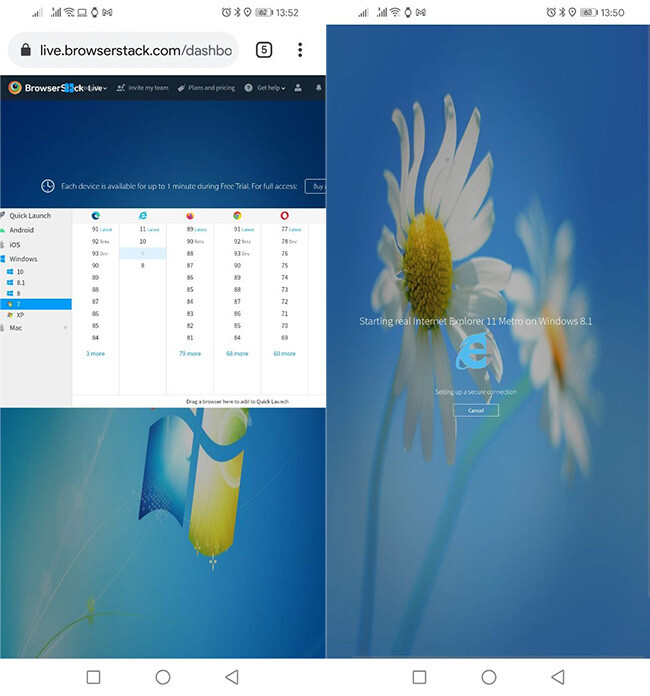
A final option available to you is to use Internet Explorer emulated. Several companies offer a similar service, although the most popular is undoubtedly Browserstack. It mainly focuses on the PC version, although it also works on Android with the downside that it can be difficult to control on a phone’s small screen: more suitable for a tablet.
BrowserStack isn’t free, it has an annual price that starts at $ 29, although you can try for free on a limited basis, maybe long enough to load the web page that resists you. Another similar and simpler option that you can use is Browserling, also a website with which you can open any website in any browser, for a few minutes.
Table of Contents


