
With the new unified Matter standard launched at the end of 2022, it is expected that home automation will enter our homes even more strongly with the next devices that will arrive throughout this year, which thanks to the new interconnectivity will be able to do many more things. things straight from our favorite wizards.
In the Android ecosystem, it is Google home and the google assistant those responsible for enabling us interconnect these household devices and create the new domestic routines make our reality smart home.
Here are the Google Home home routines
On the occasion of material standardGoogle has also improved its in-house application, Google homereleased a new interface still in testing and improve routines with the new home routines, which are available to all users.
in the app Google homewhen you are going to add a new routine or automationwe will have to choose between two types of routine: family unit the staff.
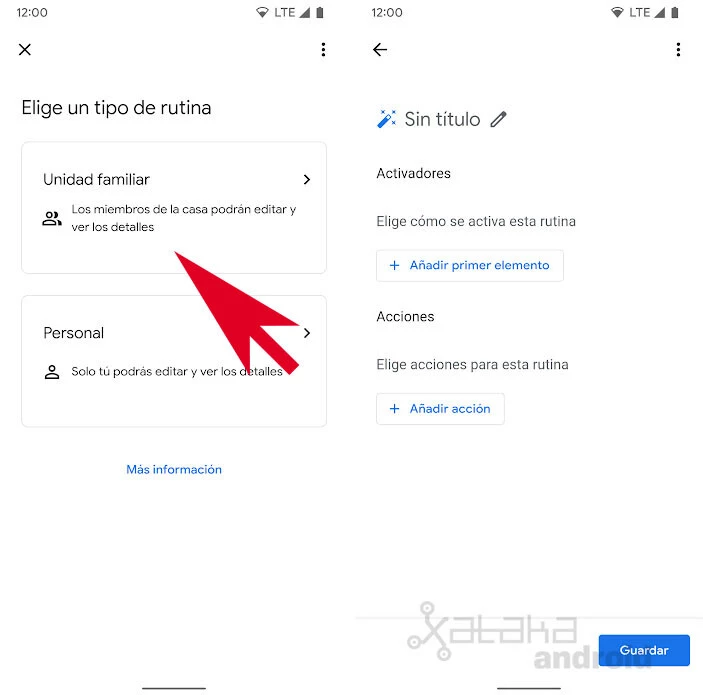

There personal routineas its name and description indicate in the application itself, are intended for our own routines that only we can modify, and are much more limited, while the family unit routines Those are the household routinesthat allow us to make more complete automations, and that are accessible to all members of the house.
For each home routine, we need to configure its activators (the event that triggers the routine) and the Shares (what we want to happen in this routine). As activators, we can create a voice command for Google Assistant, choose a specific time, sunrise or sunset, or when a device does somethingwhich is one of the recent innovations of Google Home.

This last and new option allows a device to respond with an action when another device is doing something. An activator can turn a device on or off, change its volume, change the TV input, stop playback or a temperature, among other options that will depend on the devices we have in our home.

Activators can be assigned a day and time condition, so routines run at the exact time of day, during the day, evening, or night. The application allows us to choose between any time, during the day (from sunrise to sunset), at night (from sunset to sunrise) or between two hours, as well as the days of the week when we want the routine to repeat itself.

Once this activator is configured, we must already add action that we want to happen during this routine. We can make a speaker play a message, media, information or reminders, adjust phone settings, assistant volume or adjust home appliances.
The option Adjust home appliances is the one that will allow us to do this when a device is doing something another device automatically performs another action in response. That if we turn one device on or off automatically, another device does something in response.
All of this will allow us to tell Google Home that when the TV is turned on, the amplifier also turns on automaticallyor that the brightness is also reduced or that some lights in the room are turned off at night, to name a few examples.
In Xataka Android | How to Announce Voicemails on Google Nest and Google Home Speakers


