
Expert rating
Benefits
- It looks awesome
- Folder backup
- Media playback
Our verdict
Against OneDrive, Google Drive, Dropbox and more, pCloud stands out for its ease of use, colorful interface and flexible payment options.
Price when reviewed
This value will display geotagged pricing text for the undefined product
Best price today
Price when reviewed
Annual: $59.88 (currently $49.99) for 500 GB for one year; $119.88 (currently $99.99) for 2TB; Lifetime: $299 (currently $199) for 500 GB; or $599 (currently $399) for 2TB; $1,890 (currently $1,190) 10TB
Best prices today:
We've tested a lot of cloud-based storage services for your Mac, and while the usual mainstays are still easy to recommend, pCloud might just be worth a look for you.
The Mac app is relatively simple, but it works essentially the same as its competitors, but with a delightful web interface (who knew a splash of color could make such a difference?) and the ability to purchase a lifetime subscription. It also acts as a great media player even in the web app.
Are these features enough to propel it to the top spot? Not quite. A bizarre “unlock” process to open additional free storage is interesting but a bit irritating, while some of its features, like file history, are hidden behind an additional paywall.
Still, if you haven't tried pCloud, it's worth a look, especially if you're a little tired of the usual heavy hitters.
First impressions

File backup: You can point pCloud to a folder or drive on your Mac and it will keep it in the cloud for you.
Foundry
Once you've created an account and downloaded the pCloud Drive app, pCloud will let you download and sync files to your Mac, so you can point it at a specific location and know that it will keep things up to date . This is a nice hands-free backup option to enable in case you need it.
As with many apps of its ilk, it is essentially a web application. Fortunately, pCloud's web app is clean, easy to navigate, and has a splash of color (you'd be surprised how rare this is).
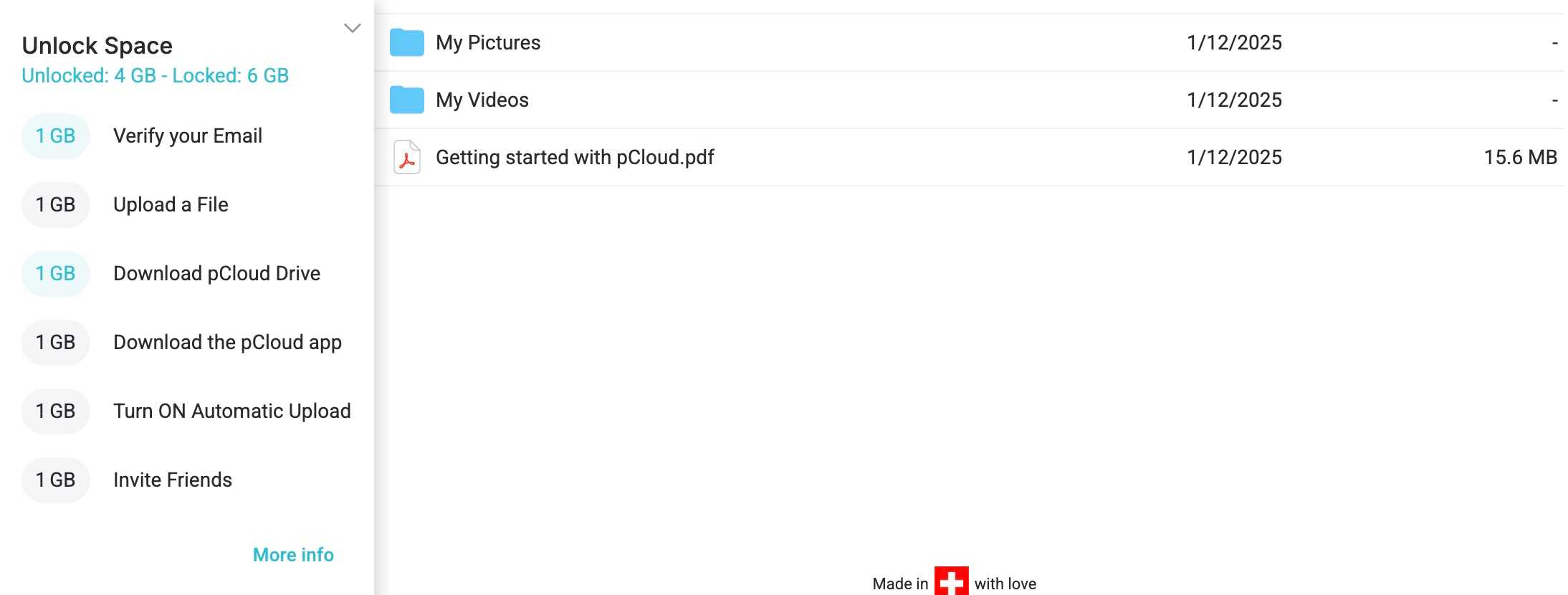
Unlock Process: The way users “unlock” more storage could be considered a drawback
Foundry
From the start you will have access to 4 GB of free storage, less than we are used to but, thanks to the “unlock” option which can be increased to 10 GB. On the one hand, this is good , and that's double what some are offering, but on the other hand, having to invite a friend for 1 GB of extra storage seems pointless: just give us the 10 GB up front!
pCloud Features

Encryption: Encryption will cost extra, even if you have a lifetime plan.
Foundry
The secret sauce of OneDrive and Google Drive is that they are great for creating files as well as storing them, but as with Sync and DropBox, pCloud is much closer to a place to edit documents shared between users or saved in the cloud. for custody.
This is a key distinction because you won't be creating documents in pCloud, but it does mean that it is therefore a very light and airy interface.
You can store and share all types of files, as well as set a directory for a local folder on your Mac to keep. You can also use a File Requests option to request files without sharing your pCloud account information.
Perhaps my favorite feature is that media plays so well in pCloud. Did you record a video? You'll be able to watch it through the in-window player, and the same can be said for the audio and images. You can even save your social media profiles, which could be ideal for anyone working in community management.
There is an additional charge for file history for 360 days (that's $80 per year), but you get 15 days to recover files for free, or 30 days with premium. There's also a “vault” for storing items with client-side encryption, but that will cost $4.99 per month.
This brings us nicely to cost. You can pay $59.88/£59.88 (currently $49.99/£49.99) for 500GB for a year, or $119.88/£119.88 (currently $99.99/£49.99, £99) for 2TB, which is a steal. You can also opt for lifetime versions, with 500GB for $299/£299 (currently $199/£199) or $599/£599 (currently $399/£399) for 2TB, or spend $1,890 /£1,890 (currently $1,190/£1,190) for lifetime access to a whopping 10 TB of storage.
Unfortunately, these additional features (additional file history and vault) are not included in these lifetime plans. Given that a user can spend well over $1,000, this is worth considering.
The disadvantages of pCloud

Web App: pCloud is quite easy to look at, which is surprisingly rare.
Foundry
These pricing issues aside, pCloud is a fantastic alternative to some of the usual suspects.
This initial unlocking process to let you access the 10GB of free storage seems like a minor hassle, and you won't be able to edit documents in pCloud, but other than that it's a fantastic option.
Should you buy pCloud?
If you're looking for lifetime cloud storage, pCloud is worth a look. It's also easy to use and has some great additional features that could make it a dream for large personal movie and picture libraries.
Table of Contents


