
As much as it is something useful in certain situations, Android does not allow to record calls in many countries, including Europe. How to overcome this problem? The best solution is Use another phone or recorder. And not only to record the voice, also in text: for interviews, I'm great, for example.
For my work, I need a recording of certain calls, the phone is generally the most suitable way to maintain certain interviews. Although I take communications notes, I often have to move a specific sentence so that it is not welcome. And with AI, I can get the perfect combo: Transcription Call Registration. It works much better than it seems.
Save calls and make them go through SMS
The safest thing is that your mobile passes like mine, that you cannot save calls because the option is not available in the country. Although it is only to check: make a call to any number and, If the recording icon does not appear on the waiting screenYou cannot save directly.

The most effective option to have recorded communications is Use a second mobile and put hands free on the callNever lack. Use the voice recorder on the second phone and you will get an audio file, which you can then transcribe from the application itself: most already incorporate the conversion into text via AI (Google, Xiaomi, Samsung, Motorola, OnePlus, Oppo …).
Most voice recorders already transcribe audios to the text: Ensuring recording is highly recommended
But let's go a little further: I usually record the call and, moreover, Save the text to theft. So I have the audio and a document. There are several ways to do so.
The most compatible: with the insistent transcription application
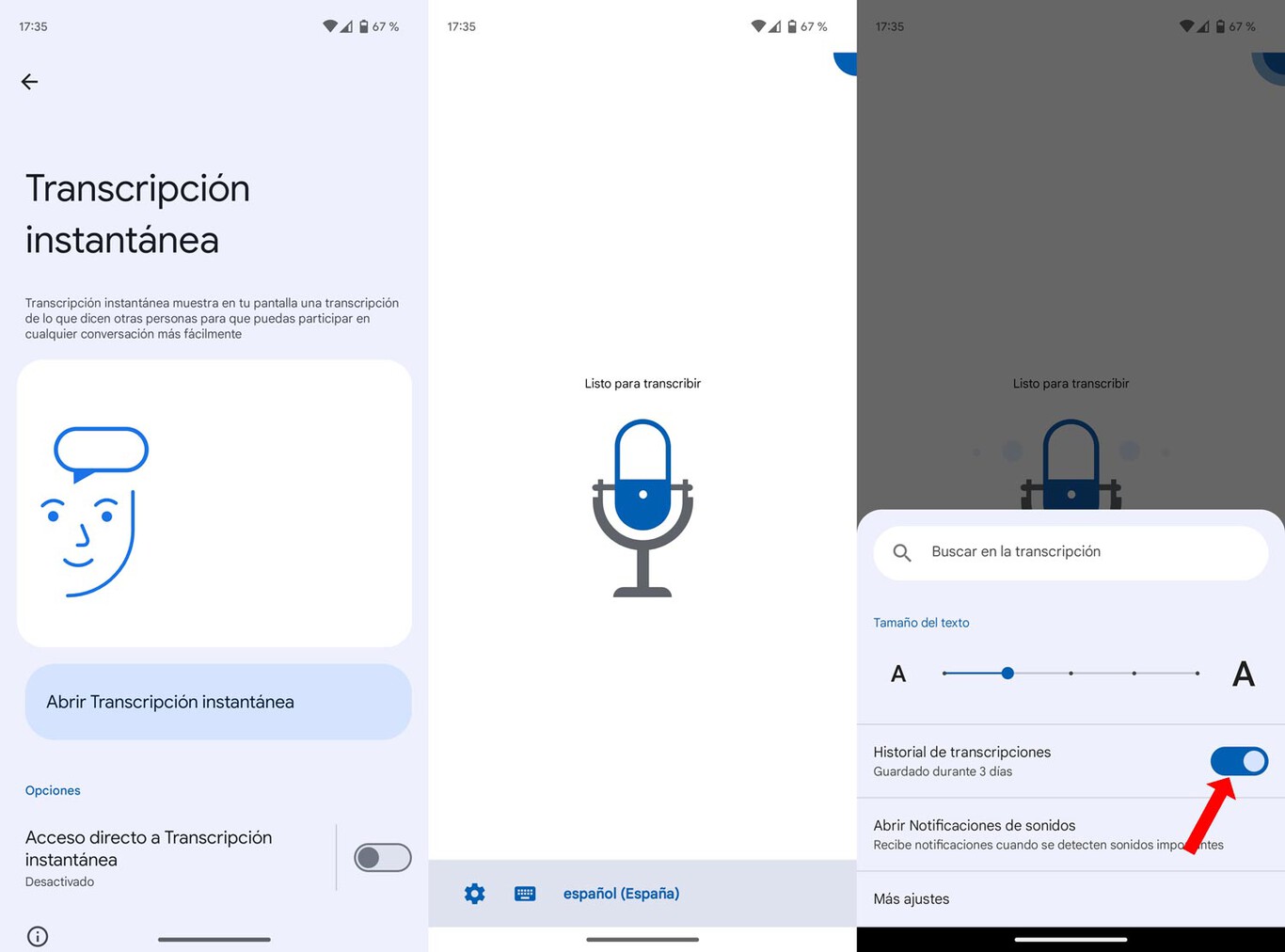
This is an option included in the accessibility tools of your Android: once Actifs captures all the voices and sounds of you to transcribe them. It is very effective, faithful to conversation and generally does not make mistakes. Google AI is doing a good job.
The process is as follows:
- Make sure that the instant transcription is installed on your mobile: access this Google Play link and check it.
- Open the application. One way to do it quickly is to write your name in the parameter search engine.
- With the open application and listen, Make the call on the other phone and place the speaker at a high volume.
- Place the phone with an enrollment in nearby execution and the application will keep everything you say.
- In addition, I also recommend that you record the call with the recorder of the second phone.
You will get a text with everything that is said. And the instant transcription holds a recording of all the conversations.
Otter.a

This tool is very powerful when transcribing calls: you can convert any live conversation to text, make summaries and even differentiate interlocutorsVery useful when you want to check what you said.
Otter.ai is free for basic use, although You must save an account. You can transcribe a maximum of half an hour by conversation, more than sufficient for most calls. Just configure the application on the second phone after installing it from Google Play, calling with the main phone, putting the speaker and using Otter.ai to capture the voices. Close the recording when you finish and you have saved everything.
As in the previous method, my recommendation is that You make a normal recording on the second phone Apart from transcription. As far as it can happen.
Con chatgpt o gemini

This is a simple method of transcribing calls using AI applications: with vocal dictation, they will transcribe everything you say during communication:
- Open the AI application on the second phone. It is valid for the majority, all often incorporate vocal dictation.
- Make the call on the first phone, put the speaker and click on the dictation in the other mobile application.
- The call ends and closes the registration of the application.
- You will have transcribed all the audio precisely: it generally does not fail. Copy the text and the turn is played. You can also send it, you will save it in the conversation with the AI.
With all the above methods, you will get a transcribed text with what you said during the call. RHe always records communications with audio: Having the file with the voices is an additional safety measure.
Cover image | GPT-4O in the Chatppt
In Xataka Android | It took many years to know that there are four ways to call with a hidden number in Android
Table of Contents


