
The phone in your hand has such a collection of sensors that you can measure a lot of values just with them. From atmospheric pressure to the radiation they emit: the smartphone is a much more complex machine than it appears. We tell you what you can do with them.
Cell phones have increased in screen size, power and also the number of cameras, but these are not the only components that have evolved in number: internal sensors have also multiplied. There are so many of them on every phone, and so varied, that they can show us information we didn’t even know. And this is precisely what we are going to check: our Android can perform a multitude of measurements only with its sensors.
Not all mobiles have the same sensors
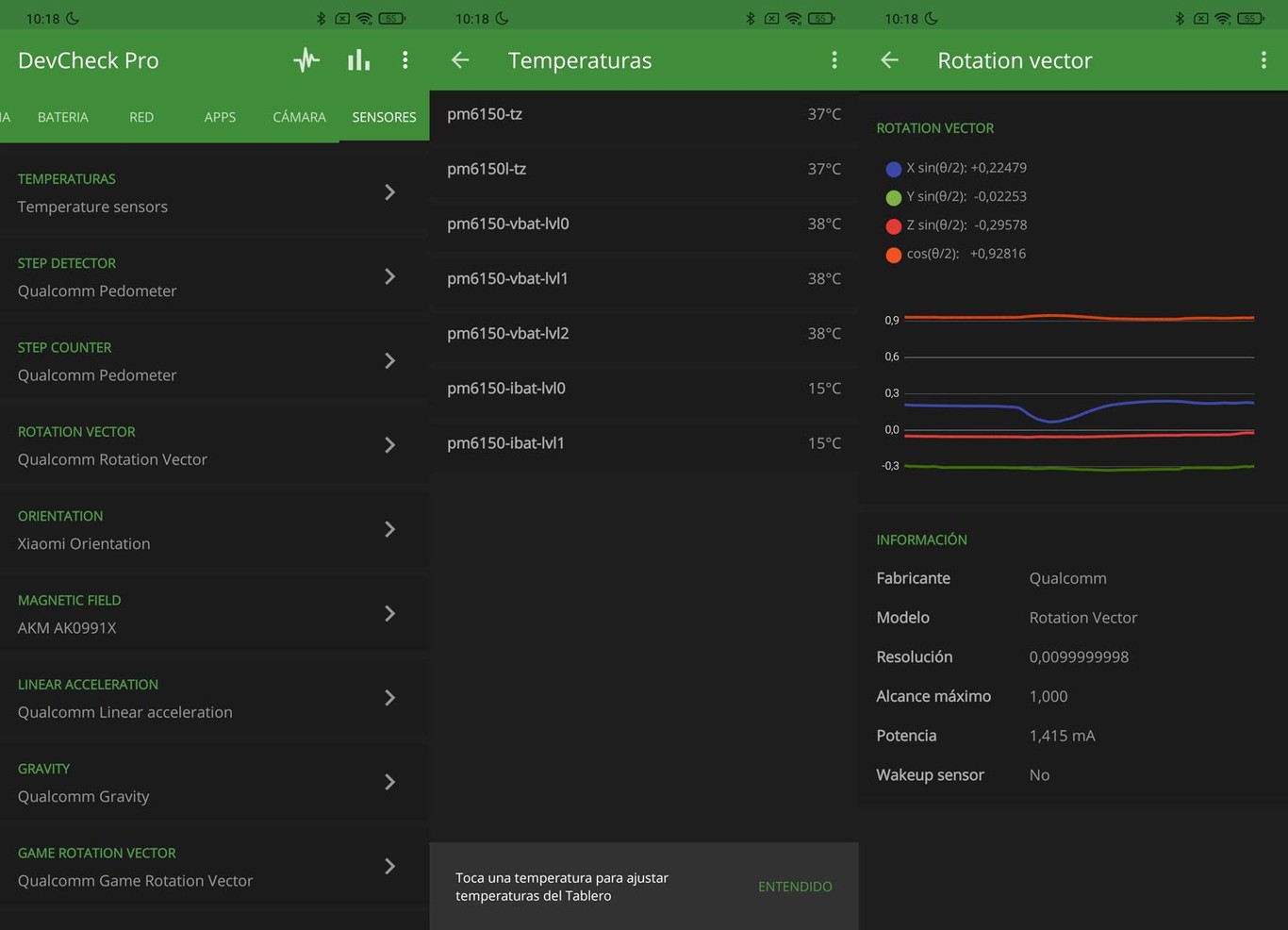
As with custom layers, the quality of the cameras or the processor, One phone may include sensors that another phone does not have. Some are generic and universal, like accelerometers, but others are only found on certain devices. Generally, the price influences: the more expensive a phone, the more sensors there are, and the better quality it usually includes.

The best way to learn about your phone’s sensors is to use an app that can perform a full hardware and software scan. DevCheck hardware and system information It is one of our favorites because it not only offers detailed information about everything that is included in the phone, but it is also very reliable, secure and ad-free.

DevCheck hardware and system information
Open DevCheck, scroll down the top tabs to ‘Sensors’ and check all the ones you have handy. Sensors that measure the temperature of key phone components, those that detect footsteps, magnetic sensors for the compass, accelerometers and also the gyroscopeThese are generally more or less frequent. And you can get readings just by entering adjustments in the gap, such as magnetic fields or phone stability.
Sensors broadcast a remarkable amount of information that is often incomprehensible at first glance. Let’s see how to make much more precise measurements.
Ambient noise

The mobiles include several microphones with which they pick up a huge amount of sound, not just the voice. And they can be used for perform ambient noise measurements. There are many applications that offer this type of measurement, such as the Sound Detector. Simple, with enough information and without strange permissions.

Sound detector
Amount of ambient light

Your phone has probably activated automatic screen brightness, this option that allows you to see it even if the lighting conditions change. Well, the person responsible for setting the automatic brightness is a sensor that is normally placed on the top of the phone. It’s him ambient light detector.
The sensor measures the amount of light hitting it and causes the screen to move up or down accordingly. You can get the lighting data with applications such as Lux light meter and tools: it is a practical photometer which will give you lighting in Lux.

Lux light meter and tools
Atmospheric pressure

Not all cellphones have a barometer, so this is one of the sensors that your cellphone may and may not have. If it is incorporated, with an app like Barometer Reborn, you will have the reading the atmospheric pressure directly from the phone.

Reborn Barometer 2020
Altitude above sea level

With the atmospheric pressure sensor, the height above sea level can also be calculated, applications such as barometer and altimeter can use said sensor to calculate altitude. However, there is a more universal way to achieve this value: GPS.
The app we’re going to use is old Android acquaintance: GPS Test. It offers a huge amount of data related to GPS positioning, including the height above sea level. Once installed, open it and press 0 at the bottom (this is the speedometer). The altitude will appear on the screen under “Altitude” (bottom right): press it and Activate GeoID ‘to improve accuracy. The number will indicate the altitude you are at (the margin of error is a few meters).

GPS Test
Speed at which you move

To calculate the speed we will use the previous application, GPS Test. The rover can determine this value by establishing the relationship between the GPS coordinates and the time it takes to go from one to the other. It’s so easy to know that you just have to open GPS Test and click on the lower number. Move around and the number will indicate your speed in km / h.
Vibrometer

It is not a sufficiently precise mobile to anticipate earthquakes, but it is possible detect small movements of the ground only with sensors installed in the device (accelerometers). It’s fascinating.
To measure the vibrations, we used the seismometer app. It is simple, has a user-friendly graphical interface and offers information at a glance. Just put the mobile on the ground, open the application and check that the phone detects imperceptible vibrations. Still without reaching the sensitivity of a seismometer, of course.

Seismometer
Horizontality and verticality counter

What is commonly called the “level”. This is one of the classic uses of accelerometers and a function that can help you if you want to. place a shelf level, for example.
As is often the case, there are a wide variety of applications capable of measuring whether a surface is completely horizontal or vertical. We chose Spirit level: it is simple to use and very easy to understand.

Spirit level
Distance between two places

With GPS, you can not only know where you are, you can also know the distance between you and any point on the planet. And you don’t have to install anything, just use Google Maps:
- Open Maps on your phone and wait for the app to position you.
- Keep pressed after which you want to know the distance to your position.
- Click on the lower part of the screen to display the marker information and click on ‘Measure distance’.
- Drag the screen to your location: Google Maps will show you the exact distance below, and in a straight line, between the two locations.
Measure between two points

Imagine you wanted to know the distance from one end of the dining room to the other and you only had your laptop. It seems like an impossible task, but it’s not like this: you can calculate the length with augmented reality apps like Measurement, from Google. And all with the phone’s sensors and camera.
Not all mobiles are suitable for length measurement because they must be compatible with Google Play services for augmented reality. If so, all you need to do is install the app, open it, and click the ‘+’ at the bottom of the screen. Drag to the other end you want to measure and The measurement will overprint the length in centimeters.

Measurement
Orientation

The magnetic sensor or magnetometer could not be missing in our list of values that can be measured with the phone. You’ve probably used it more than once if only out of curiosity: your mobile can become a magnetic compass.
It is very common to have the magnetic sensor, just like having a compass app on the phone. In case you don’t have one, you can use Digital Compass: it’s simple and lacks weird permissions. Open it up and you will be able to orient yourself even if you do not have mobile data.

Electronic compass
Table of Contents


