
For a few years now, Google Play has been telling you if your mobile is certified from its settings, this being a relatively easy way to know if the terminal has been modified or if there is something strange with it. We tell you what is Google Play certification and how it affects you.
The normal thing is for your mobile to show up as certified in Google Play, but if not, at the moment there doesn’t seem to be much of an impact. We will see what this certification means and how to check if your mobile is certified.
What is the Play Protect certification
For a manufacturer to include Google’s Android customizations that are not part of AOSP and pre-install Google’s suite of apps, you must meet a number of requirements. It is necessary to respect the provisions of the CDD document (compatibility definition document) of each version of Android and therefore to have the appropriate license to integrate Google applications.
To include Google services in a terminal, it is necessary to meet a series of requirements and tests. Google Play certification verifies that everything is in order.
Part of this verification assumes that the device passes a series of tests which verify that indeed, everything is configured as expected and that the terminal includes the software and hardware capabilities requested by Google. These requirements range from the minimum number of megapixels the camera has to how beauty mode is applied in the camera app.

The list of certified mobiles is public and can be viewed here
Google Play certification is therefore used to check that the mobile meets the integration standards for Google applications and services. After passing the certification, the specific model of the device is added to the list of supported devices, which is public and specific to each variant of the device that has been launched with Google services.
Only mobiles that pass this certification can include google apps, at least legally. In order to detect those who do so without having the proper papers, Google Play has long indicated the certification status of your device.

How to know if your mobile is certified
Until a few years ago, it was almost impossible to know if the manufacturer included Google services without permission or if someone changed the system ROM before purchasing it, but that has changed since version 7.4 of Google Play, at the time. Since then it is possible to check the status of the Play Protect certification from Google Play settings.
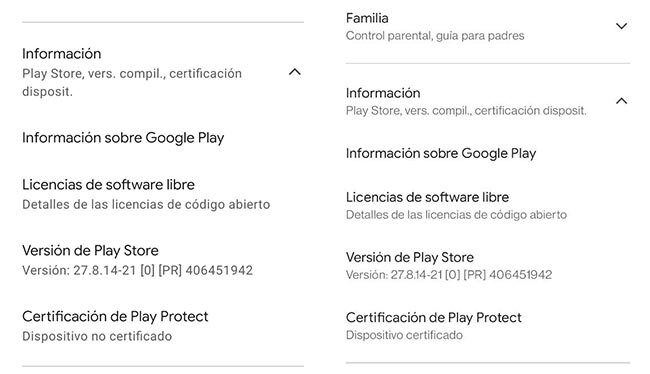
Example of non-certified (left) and certified (right) mobile
The process is very simple. First, open Google Play and tap on your profile picture, then tap on Settings. Show panel Information and you will see the data at the bottom, in the row of Play Protect certification. It will put “Certified device” or “Non-certified device” there.
What to do if your mobile is not certified
The normal thing is for your mobile to be certified, unless you changed the ROM or bought it used or imported. If your mobile is not certified, it means there is no evidence that the terminal meets the tests and requirements established by Google. According to Google, the repercussions are:
-
Devices without Play Protect certification may not be safe.
-
Devices without Play Protect certification may not receive system updates or Android apps.
-
Google apps included in devices without Play Protect certification are unlicensed and may have been counterfeit.
-
Apps and features on devices without Play Protect certification may not work properly.
-
Backing up data from a device without Play Protect certification may not be created safely.
Basically, the main idea is that the mobile in its current state has not passed Google’s tests, so it could be more precarious. In the past, there was news that apps like Android Messages or Duo would stop working on uncertified mobiles, but that doesn’t seem to be the case, at least so far: to date there are no repercussions for the user
If you have installed a ROM in the mobile, it appears as uncertified, this is normal. Now alright if you bought a mobile and it appears as uncertified, it never hurts to contact the manufacturer to try and get a solution in this regard, as there is always a possibility that in the future some apps will stop working on it.


