
Formerly Android Auto appeared on mobile as one more application to which you can access from app drawer, but things have started to get messy since it was rolled out in the Android Auto app for phones and its subsequent demise. Android Auto is then part of the system, and finding its settings is really hidden.
Forget about hidden object finding games, it will be difficult for you to know where Android Auto settings are in new Android mobile, since the menu changes place in each layer and version. There is a more elegant solution: create a shortcut to Android Auto settings on the mobile home screen.
Android Auto settings at your fingertips
Since Google has discontinued Android Auto for phones, it can be a bit difficult to access Android Auto settings when the phone is not connected to the car. Android Auto is one of the latest versions of Android – it’s a pre-installed app – but cannot be launched as another application. The way to access your options is from mobile settings.

The problem is that setting up Android Auto is in different menus on mobile phones with layers from Xiaomi, Samsung, Realme or with Android close to stock, so the most surefire way to access the options is with the search engine settings at the top. It’s not very practical if you want to go to the settings from time to time because you like to tweak Android Auto.

There’s a better way: by creating a shortcut to Android Auto’s settings. Specifically, to the Android Auto activity where the settings are. To do this, you will need a launcher like Nova Launcher, which allows you to create direct access to activitiesor an app like Activity Launcher, which lets you do the same thing in any launcher.
The process is similar in both cases. If you opt for Nova Launcher, the first step will be to long press on the desktop to open the widget switcher. Choose the Activity widget, from Nova Launcher, then locate Android Auto in the list and view its activities. Tap the activity called Settings (.companion.settings.DefaultSettingsActivity) to add the shortcut to your mobile home screen.
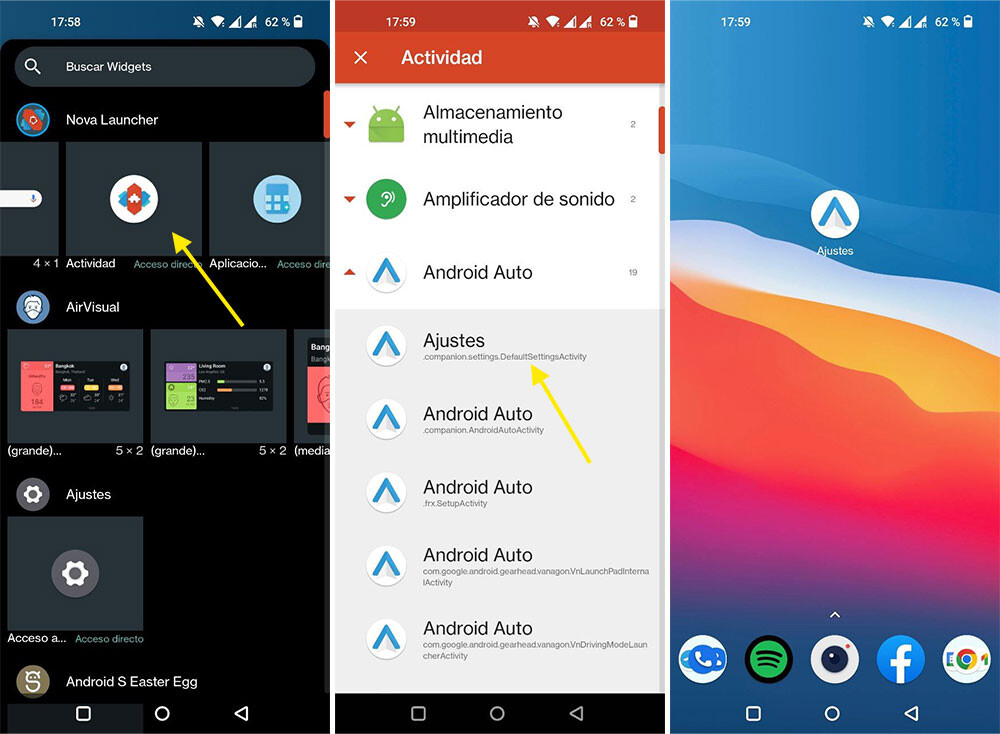
If you are not using Nova Launcher, the process with Activity Launcher is very similar. After opening the application, display the Android Auto activities and long press on the Settings activity then use the menu Create direct accesswith which you can also customize the access name.
From this moment you will be able to access the Android Auto settings from your mobile’s home screenlike any other app and without having to fiddle with Android settings or use search.


